Apps, agents and integrations
Some problems were never software problems. Until now.
Some of the money leaks out in places a phone call never reaches: the agreement riding in the truck, the clipboard at the desk, the job photo lost in a text thread. We build small, purpose-built apps for exactly those, on the phone your crew already carries.
Scoped per client under AI Command Center. One screen for one problem, connected to the CRM you already run.
- Paper agreements riding in the truckSigning portal on the tech’s phone
- A clipboard at the front deskTablet check-in with digital intake
- Job photos lost in text threadsA job record the office can see
- A spreadsheet three people editOne screen, one source of truth
- Quotes typed twiceQuote once, it lands in the CRM
What counts as an app problem
The leaks a workflow cannot reach.
Most of what leaks out of a home service business leaks through the phone, and the rest of this site is about that. Some of it never touches the phone. A termite agreement gets signed on paper at the property and rides back in the truck for two days. The front desk hands a new customer a clipboard, and someone types it in later, or does not. A tech texts job photos to the owner, and a month on nobody can find them. Three people keep the schedule in one spreadsheet and overwrite each other.
None of those is a follow-up problem. A workflow cannot fix them, because the information never entered a system in the first place. They are app problems: one screen, built around one job, that puts the information where the office can see it the moment it exists.
For most of the last twenty years a purpose-built app meant a long project and a budget only a large company would sign. Three things changed. The cost of building a small, specific app fell far enough that a single crew can justify one. It runs in the browser of the phone the crew already carries, so there is nothing to buy and nothing to install from an app store. And it plugs into the CRM that already runs the rest of the business, so what the app captures lands next to the calls, the texts, and the calendar instead of in another silo.
That is the whole idea. Not a platform. One screen for one problem, connected to what you already have.
Where it leaks
Four problems that were never a phone call.
Each one has a paper, a clipboard, or a file at the center of it. Each one has an app-shaped fix.
- 01
The agreement rides in the truck.
A customer signs on paper at the property. The paper comes back when the truck does, gets scanned if someone remembers, and lives in a drawer. The fix is a signing portal on the tech’s phone: the customer reads and signs on site, and the signed copy is filed in the CRM before the truck leaves the driveway.
- 02
The clipboard at the front desk.
New customers fill in a form by hand. Someone retypes it, or does not. Half the fields are blank and the phone number is missing a digit. The fix is a check-in screen on a tablet or the customer’s own phone that writes a clean contact straight into the CRM, with the fields your intake actually needs and nothing else.
- 03
Job photos in a text thread.
The tech texts before-and-after photos to the owner. They are proof of the work, and a month later nobody can find them. The fix is a job record the office can see: the tech taps the job, takes the photos, and they file themselves under the right customer and the right visit.
- 04
The spreadsheet three people edit.
The schedule, the price list, or the inventory count lives in one file. Three people edit it. Two overwrite each other. The fix is one screen with one source of truth, with the CRM or the calendar as the record and the spreadsheet retired.
Integrations and custom agents
Connect what you already run. Add agents where they pay.
Most of the value is not in a new tool. It is in the tools you already pay for finally talking to each other, and in agents that do the repetitive steps between them.
Integrations
- Your CRM, calendar, phone, and website in one system.
- Accounting and invoicing, so a booked job and an invoice stay in step.
- Field service and scheduling tools, through their APIs or through automation.
- Google Workspace or Microsoft 365 for email, calendars, and files.
Custom agents
- A quoter that writes the quote and follows up on it.
- An inbox agent for Instagram and Facebook messages.
- A paperwork agent that replaces the clipboard.
- Any job that follows the same steps every time.
How it is built
- Existing connections first; custom code only where it pays.
- Multi-step, multi-system automation with tools like n8n.
- Documented, so it is never a black box.
How a build runs
From the leak to a screen the crew taps.
Four steps. The first two are conversations, and the second one decides whether you need an app at all.
The AiGPA, or a 30-minute call
Find the leak
The AI Profit Gap Assessment usually surfaces it, because it walks through where information goes missing between jobs. If you already know the problem, a 30-minute call is enough to hear it. Either way we start from the leak, not from a feature list.
One working session
Scope one screen
We write down three things: what the screen replaces, who taps it and where they are standing when they do, and what it writes to the CRM. That page is the whole spec. If a form or a workflow in your CRM would do the job, we build that instead and tell you so.
Scoped per client
Build and pilot with one crew
The app goes to one crew or one desk first, on their own phones. We watch it get used against real jobs, fix what the crew finds, and only then roll it out to everyone. Timelines come from the scope, and you sign off on the milestones before anything is built.
Ongoing
Run it
Hosting, fixes, and changes as the business changes are part of the engagement, not a second project. When you add a service, a form field, or a second location, the screen changes with it.
Built, and in use
One you can look up.
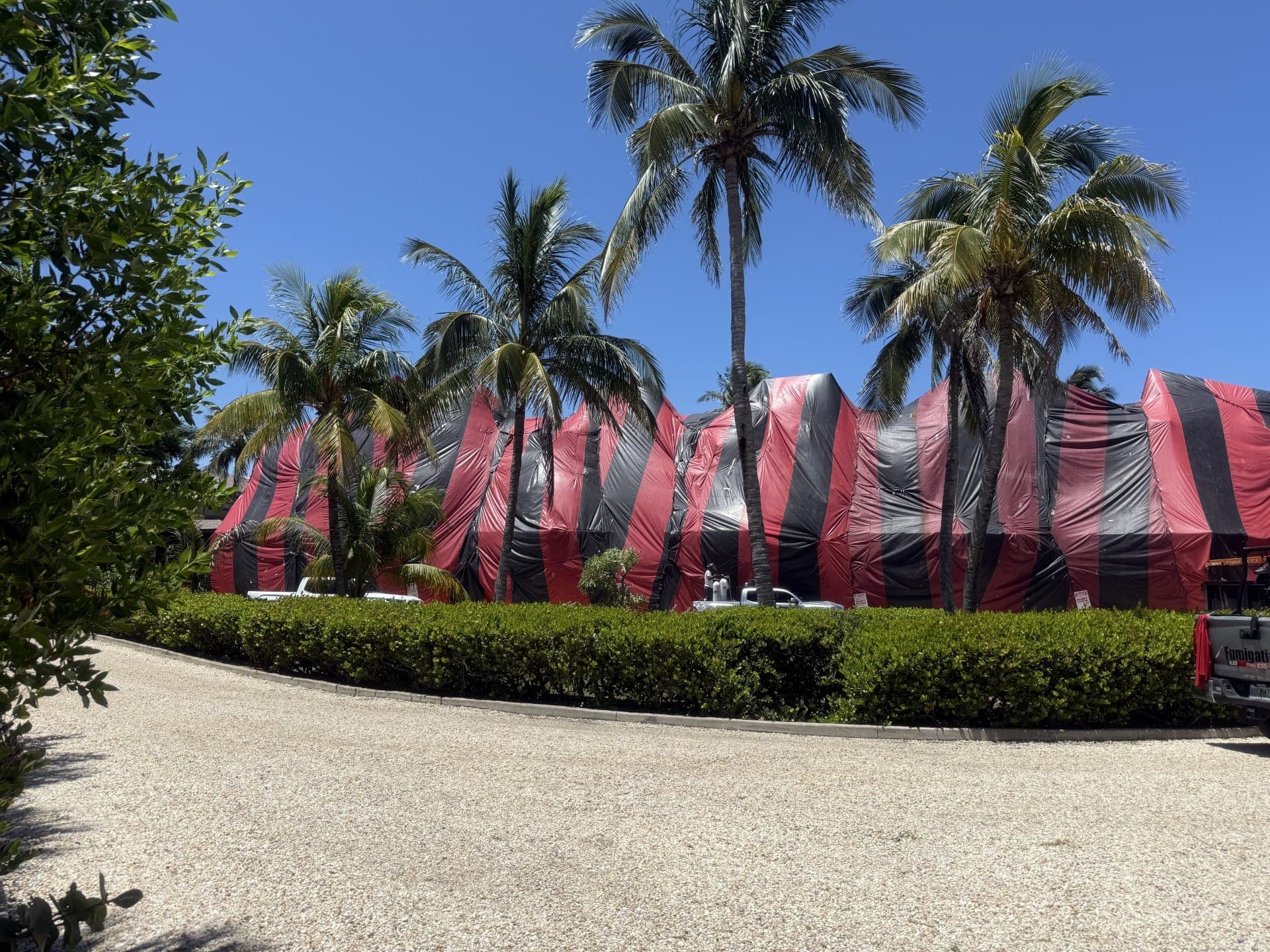
KJC Fumigation agreed to be named. Their app problem was the paper agreement that used to ride back in the truck after every tenting job. Here is what was installed for it. No numbers, because we do not publish numbers we cannot stand behind.
Photo · KJC Fumigation’s own work and vehicles Tent fumigation and pest control · Miami
KJC Fumigation
What was installed
- A field agreement portal for tent fumigation jobs on the technician’s phone
- On-site reading and signing by the customer at the property
- Signed copies filed and searchable from the office the same minute
- Writes to the same CRM that runs their pipelines, calendars, and Voice AI receptionist
We do not publish client numbers. No agreements-per-month, hours saved, or revenue figures appear here, because none have been independently verified and cleared for publication. What you see is what was built. The photo shows the client’s own work, not ours.
Questions owners ask about custom apps
Do I need an app, or can the CRM do it?
Try the CRM first, and we will tell you if it can. GoHighLevel has forms, documents, pipelines, and workflows, and a lot of what looks like an app problem is a form and a workflow. You need an app when the screen has to be built around one job: a customer signing at the door, a tech taking photos in a crawlspace, a desk that checks people in all day. Those people are not CRM users, and they should not have to be.
What does it cost?
It is scoped per client under AI Command Center and quoted after the assessment or the scoping call. There is no number on this page because the price depends on what the screen replaces and what it has to write to. What we can say is what we say about every plan: setup is never waived or discounted, and nothing is built that the scope did not call for.
Who owns it?
The written agreement for the engagement spells out ownership before anything is built. Our website terms do not cover paid work; that agreement does. Whatever the app writes, whether signed agreements, intake records, or job photos, lands in your CRM account, where your office can read and download it.
What if my needs change?
Then the screen changes. The apps are small on purpose, so a new field, a new service, or a second location is a change, not a rebuild. Under AI Command Center the weekly strategy call is where those changes get decided, and the quarterly roadmap review is where the next build gets picked.
Does it work on iPhone and Android? Does it work offline?
It runs in the phone’s browser, so iPhone and Android alike, and it can be added to the home screen so it opens like any other app. Nothing comes from an app store and nobody needs a company phone. It needs a signal to save, the same as the CRM does. If your crews work where there is none, say so in the scoping session and we plan for it rather than promise around it.
Bring us the problem, not the spec.
Describe the paper, the clipboard, or the spreadsheet in your own words. We will tell you whether it is a form, a workflow, or an app, and what happens next.